
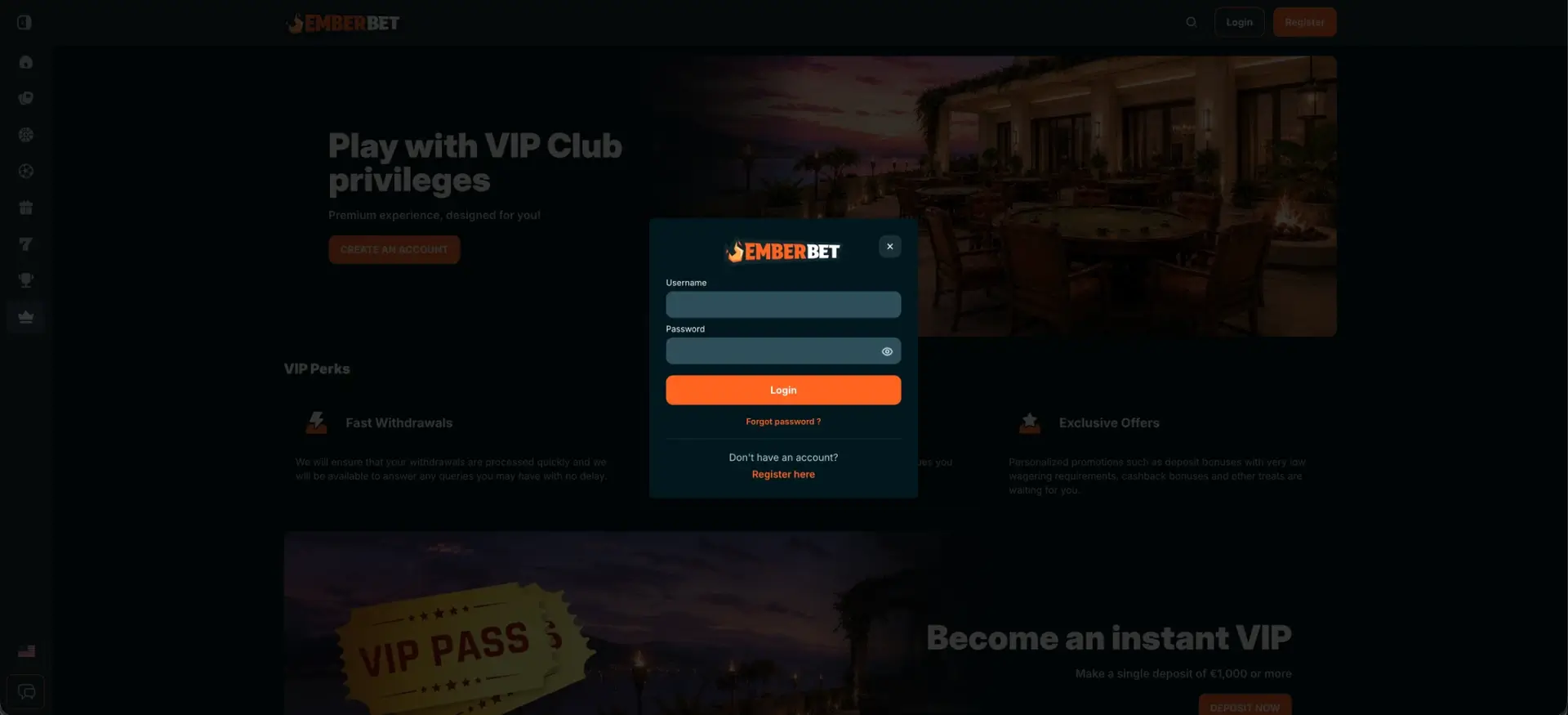
To use EmberBet login, click the Login button in the top-right corner of any page, next to Register. A pop-up opens where you enter your username and password, then click the orange Login button. It works the same way on desktop and in mobile browsers. There is no app to install. If you can't sign in, the Forgot password? link under the button resets your password by email. If the account is blocked or the form won't respond, the live chat button at the bottom of the left-hand bar is available without logging in.
The EmberBet account is protected by TLS-encrypted connections and hashed password storage, and the operator says two-factor authentication can be turned on in the account settings. One sign-in gives access to the casino, live casino and sportsbook, all on one balance. Because the operator, Green Champions Leader S.R.L. of Costa Rica, does not hold a UK Gambling Commission licence, account security and dispute handling follow the operator's own terms. Good password habits matter more than usual for that reason.
| Login essentials | Details |
|---|---|
| Where to log in | Login button, top-right corner of every page |
| Login method | Username + password in a pop-up window |
| Two-factor authentication | Available, enabled in account settings |
| Password reset | "Forgot password?" link in the login window, reset by email |
| Device support | Desktop and mobile browsers; no native app |
| Session security | TLS encryption, hashed passwords |
| When verification appears | Mandatory before the first withdrawal |
| Currency | Set at registration (GBP listed among supported currencies), cannot be changed |
| Support | Live chat (bottom of the left-hand bar) and email |
How to use EmberBet login
The login window looks the same on every page, so you can sign in from the home page, a game page or the promotions section without losing your place. After logging in, the page you were on stays open with your balance shown in the header.
Step-by-step EmberBet login
Signing in takes a few seconds once you know your username:
- Open the EmberBet site in a current browser such as Chrome, Safari, Firefox or Edge.
- Click Login in the top-right corner. It is the outlined button to the left of the orange Register button.
- Enter your username in the first field.
- Enter your password. Passwords are case-sensitive, and the eye icon shows the characters so you can check them.
- Click the orange Login button.
- If two-factor authentication is on, enter the code from your authenticator app.
The login form asks for a username, but registration only asks for an email address. This is the most common cause of first-time login failures. The username is shown in the account profile and in the registration confirmation email. Check it there before your first logout.
Create an EmberBet account if you don't have one
If you don't have an account yet, the login window has a Register here link under "Don't have an account?". You can also use the orange Register button in the header. Both open the same short registration form.
Quick registration flow
The form has four fields and takes about a minute:
- Enter an email address you can access; it is used for confirmation and password resets.
- Create a password. Use at least 12 characters and don't reuse a password from another site.
- Choose the account currency from the drop-down list. This can't be changed later, so pick GBP if it is offered.
- Add a bonus code in the optional field if you have one.
- Click Continue, finish the profile, and note your username for future logins.
Secure EmberBet login practices
The account holds real money and identity documents. A UK regulator can't step in if someone else gets access, so these habits are worth following from day one:
- Turn on two-factor authentication in the account settings right after registration.
- Use a unique password stored in a password manager, not a variation of your email password.
- Only type your login details on the EmberBet site itself. Never enter them through links in unexpected emails or messages.
- Log out after playing on a shared or public computer, and don't let the browser save the password there.
- Check the account's transaction history now and then for deposits or withdrawals you don't recognise.
- Set deposit and session limits in the account area. GamStop doesn't cover EmberBet, so these are the main self-control tools.
EmberBet password recovery
A forgotten password is reset from the login window itself, with no need to contact support. The reset link goes to the email address used at registration, so you need access to that inbox.
Reset steps
The full reset usually takes a couple of minutes, depending on how quickly the email arrives:
- Click Login in the top-right corner.
- Click Forgot password? under the Login button.
- Enter the email address linked to your EmberBet account and submit it.
- Open the reset email. Check spam and promotions folders if it isn't in your inbox within a few minutes.
- Follow the link and set a new password that you haven't used on EmberBet before.
- Return to the site and log in with your username and the new password.
If the email never arrives, the address may have a typo from registration. In that case, live chat can confirm the email on file after a few identity questions.
EmberBet mobile login
EmberBet has no native iOS or Android app, so mobile login happens in the browser. The Login button stays in the top-right corner of the mobile layout, and the pop-up form has the same username and password fields as on desktop. After signing in, the full casino, live casino, sportsbook and cashier are available.
Tips for mobile
A few settings make mobile logins faster and more reliable:
- Add EmberBet to the home screen (Safari: Share → Add to Home Screen; Chrome: menu → Add to Home screen) to open it in full-screen mode.
- Let the phone's built-in password manager (iCloud Keychain or Google Password Manager) fill in your details, protected by Face ID or a fingerprint.
- Keep the authenticator app on the same phone so two-factor codes are one tap away.
- Switch from mobile data to Wi-Fi if the login spins without finishing on a weak signal.
Troubleshooting common EmberBet login errors
Most login problems at EmberBet fall into four groups. Each can usually be fixed without contacting support.
Incorrect credentials
An "incorrect username or password" message usually means an email was entered where the username belongs, or Caps Lock is on. Check the username in the registration confirmation email, use the eye icon to check the password, and try once more. After several failed attempts, use Forgot password? rather than guessing again, since repeated failures can lock the account for a while.
Browser or cache issues
If the login window opens but doesn't respond, or the page reloads without signing in, the cause is usually stored browser data or an extension:
- Clear cookies and cache for the EmberBet site, then reload the page.
- Turn off ad blockers and script blockers for the site, since they can stop the pop-up from submitting.
- Try a private window or a different browser to rule out a local problem.
- Update the browser, because older versions may not support the site's security settings.
Two-factor code fails
Authenticator codes depend on accurate time. If a code is rejected, set the phone's date and time to automatic and enter a fresh code just after it appears, not one about to expire. If the authenticator app was lost with an old phone, live chat can reset two-factor authentication after an identity check.
Account blocked
An account can be locked after too many failed logins, during a document check, or because a self-exclusion or cool-off period set by the account holder is active. A lock from failed attempts usually lifts on its own after a short wait. In other cases, contact live chat: it's available without logging in and can explain the reason and the steps needed. Accounts under self-exclusion stay closed until the chosen period ends.
What you access after EmberBet login
After signing in, the header shows your balance and an account menu, and the left-hand bar opens every section of the site:
- Cashier: Deposit and Withdraw tabs. Deposits from about £17; withdrawals via MiFinity or crypto from about £86 to £860 per request.
- Casino and live casino: 7,000+ games, including live roulette, blackjack, baccarat and game shows.
- Sportsbook: pre-match and live betting, Bet Builder, streaming and the bet slip on the same balance.
- Promotions: the welcome package (250% up to about £2,580 + 1,000 free spins) and the weekly calendar of reloads and free spins.
- Jackpots and tournaments: the EmberBet jackpot network and active provider tournaments.
- VIP: VIP Pass, available with a single deposit of about £860 or more.
- Account settings: password, two-factor authentication, documents, transaction history and responsible gambling limits.
EmberBet account verification (KYC)
Logging in and depositing don't require verification, but the first withdrawal does. The usual documents are photo ID (passport or UK driving licence) and proof of address from the last three months, such as a utility bill or bank statement. The casino may also ask for proof of the payment method, such as a MiFinity account screen or crypto wallet details.
Uploading documents right after the first login is the easiest way to avoid a wait later. The check then runs while you play, and the first withdrawal request can be processed straight away. Make sure the name and address on the documents match the account details exactly. A mismatch is the most common reason for extra document requests.
EmberBet login FAQ
Short answers to the most common questions about signing in to EmberBet.
Where is the EmberBet login button?
It is in the top-right corner of every page, next to the orange Register button. On mobile it stays in the same place.
Do I log in to EmberBet with my email or a username?
The login form asks for a username. Registration uses an email, so check the username in your profile or the confirmation email.
How do I reset my EmberBet password?
Click Login, then Forgot password?, and enter your registration email. Follow the link in the email to set a new password.
Is there an EmberBet app for login?
No. EmberBet works in mobile browsers. A home screen shortcut opens the site in full-screen mode, much like an app.
Does EmberBet support two-factor authentication?
Yes. The operator says two-factor authentication can be turned on in the account settings, and it's recommended for every account.
Why is my EmberBet account blocked?
Common reasons are repeated failed logins, a pending document check or an active self-exclusion. Live chat can explain the specific reason without you logging in.
Can I use EmberBet login with GamStop?
EmberBet does not hold a UK Gambling Commission licence and is not connected to GamStop. Limits and self-exclusion have to be set inside the EmberBet account.
Last updated: 18 October 2026